Reduce missed opportunities and help a growing team manage more relationships.
Operations & decisions
Build
Build an AI command centre over business data.
Automate
Summarize sales, inventory and receivables; flag exceptions and assign actions.
Grow
Give managers faster visibility and a repeatable way to resolve bottlenecks.
Selected work. See the actual interfaces.
Original project interfaces, with a clear explanation of the workflow and its current implementation.
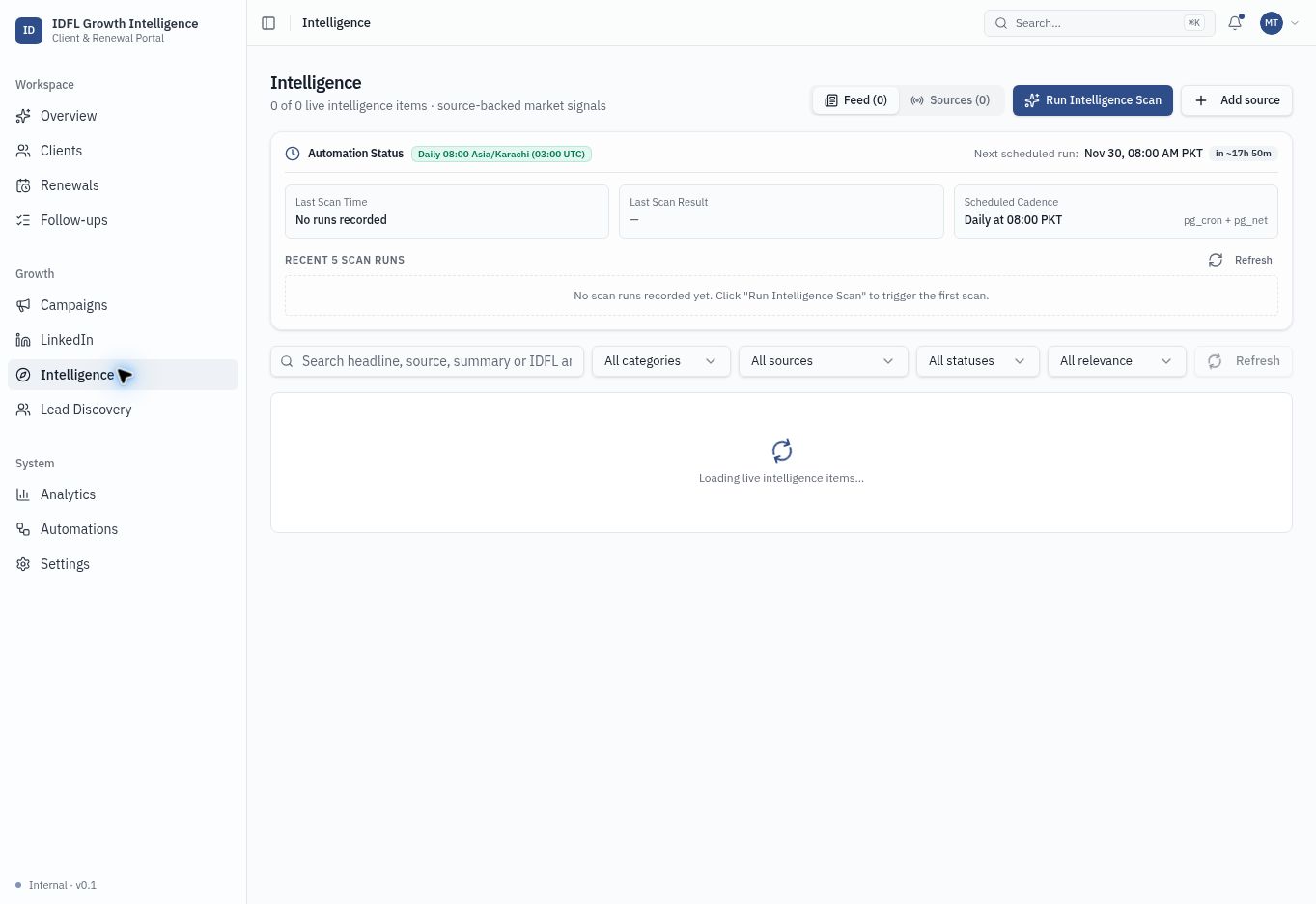
IDFL Content Intelligence
Content research / reviewed campaigns
An intelligence workspace for source monitoring, relevance filtering and turning updates into useful content. Captured from the Intelligence module of the supplied Growth Compass application.
Source collection, duplicate checks, topic filtering and draft preparation can reduce repeated research. A person reviews claims and approves publication.
Original app interface captured locally. The backend was disconnected; the feed is not a demonstration of live collection.
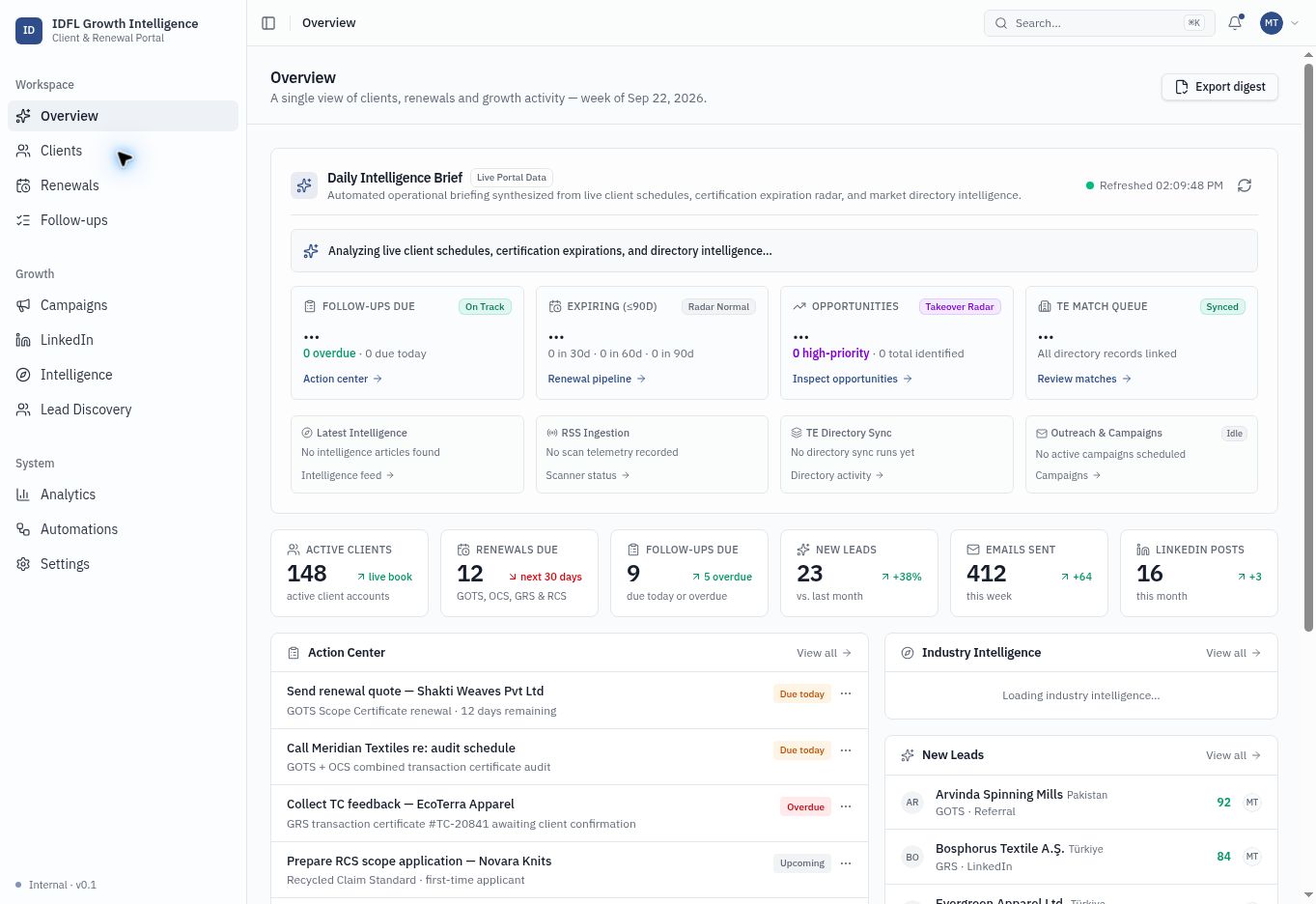
IDFL Growth Compass
Client records / timely follow-ups
A workspace bringing client relationships, renewals, follow-ups, campaign planning and growth reporting into one place.
Renewal reminders, owner queues, audience segmentation and scheduled campaign workflows can help teams follow through consistently.
Original app capture using its built-in development/default figures. Live client records, campaign delivery and business results were not verified.
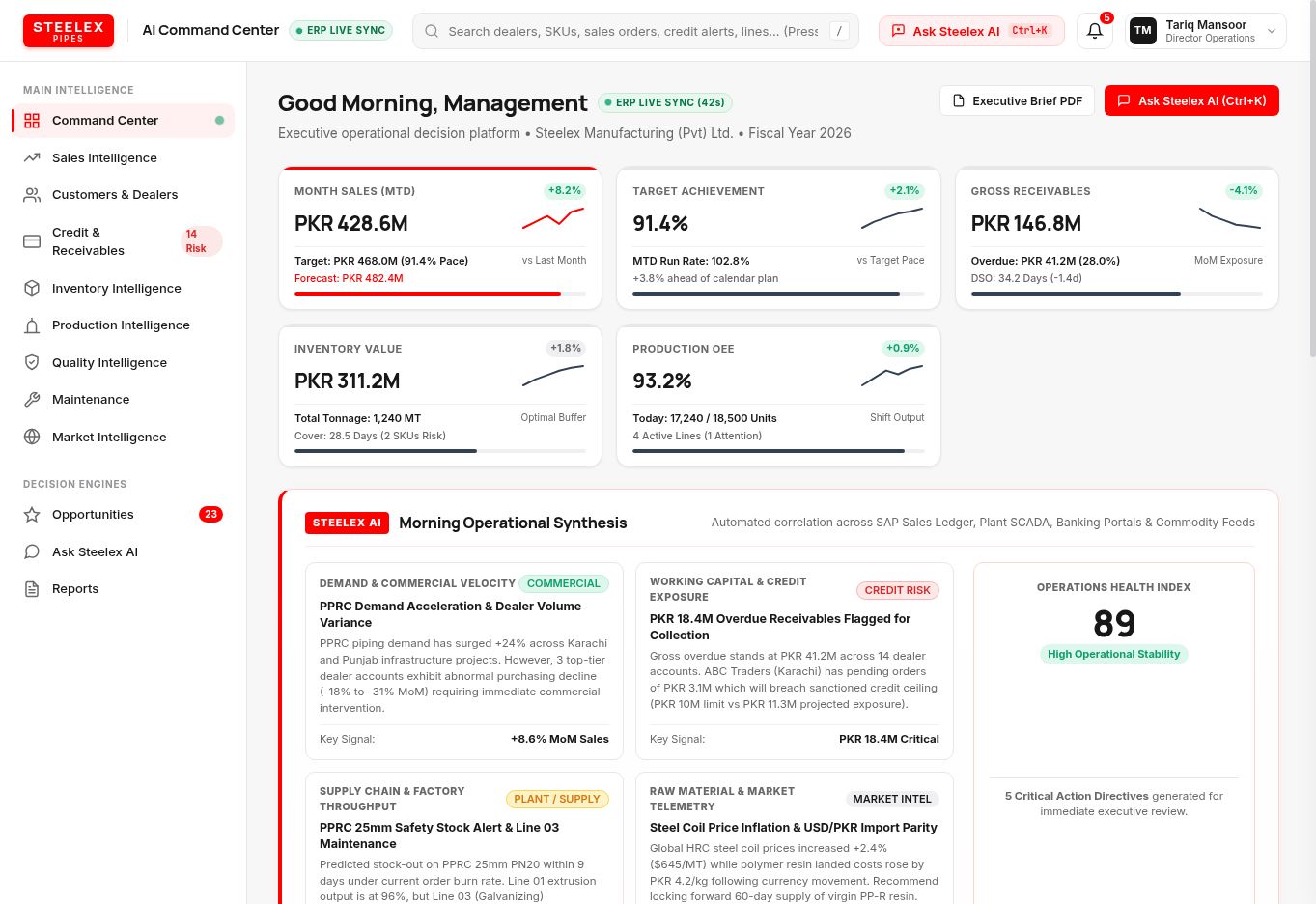
Steelex AI Command Centre
Operational signals / management action
A working interface prototype combining sales, stock, receivables and management intelligence in one command centre.
Read approved business records, highlight exceptions, summarize performance and prepare actions for accountable owners.
Original supplied frontend prototype with mock data. ERP sync indicators, AI scores and financial figures are simulated; no live ERP integration is demonstrated.
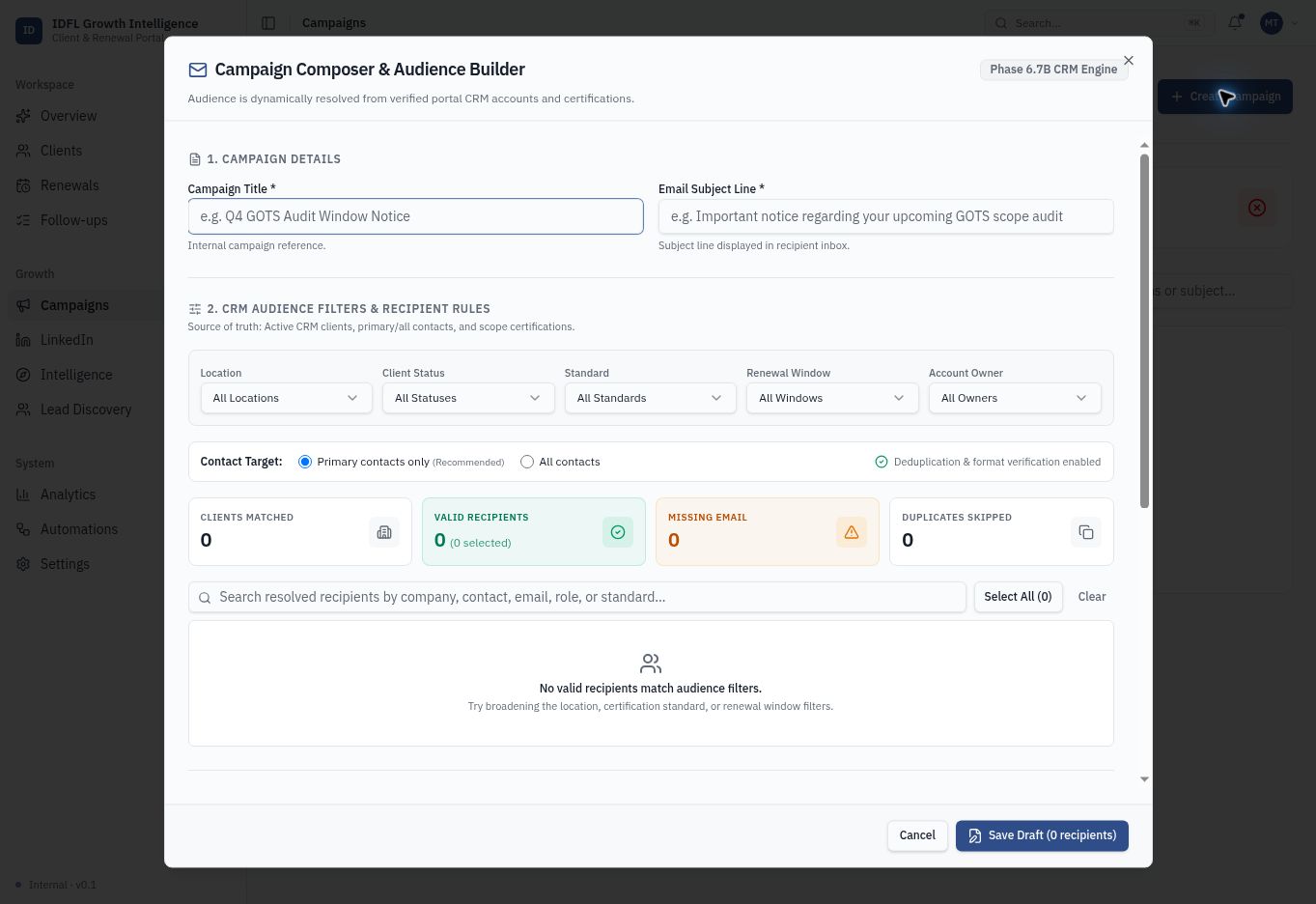
View Growth Compass campaign composer
Audience targeting and scheduling interface captured without sending a campaign.
Keep your systems. Connect the work.
Proposed architecture, subject to technical discovery. Your ERP, CRM or accounting platform remains the system of record. Connectors and permissions are agreed during technical discovery.
Business channels
WhatsApp / Website / Email / Social / Campaigns / Dealer communication
Authorized API or integration bridge / Business objects / Existing applications
Connect your existing tools
Use approved APIs, validated exports or an integration bridge for the platforms your team already uses. Confirm data ownership, permissions and supported actions before implementation.
Map customers, items, quotations, orders and invoice drafts to approved business objects. Confirm object-specific draft and approval behaviour before enabling writes.
Permissions and reliability
Keep credentials server-side behind TLS and least-privilege identities. Validate every payload. Use idempotency keys, reconciliation, bounded retries, error queues and audit records. Human review precedes consequential transactions; an AI suggestion alone never posts an entry.
Explore the full capability list
Systems that do the work.
I design and build intelligent systems that connect business operations, automate repetitive workflows and make existing software more productive.
AI agents & assistants
Interpret requests and prepare authorized next actions.
Marketing automation
Connect research, drafts, review and reporting.
Business process automation
Route work across people, rules and applications.
Document processing
Structure information and surface exceptions for review.
ERP & system integration
Design controlled connections to business records.
Executive intelligence
Turn traceable data into useful management answers.
Conventional software stores and displays.Intelligent workflows receive, analyse, validate and act.Human approval controls the consequential steps.
Experience the workflow.
Four connected browser demonstrations. All business records and prices are fictional. Draft generation and management questions use deterministic logic; publishing, messaging and ERP actions are simulations.
Company-wide possibilities.
A concise discovery catalogue. Each workflow needs a process owner, an agreed baseline and access to the relevant systems.
Business value. With the assumptions visible.
Explore an illustrative scenario in PKR. Recovered staff capacity is productivity value, not automatic payroll savings. This is not pricing or a financial guarantee.
Calculation method and practical limits
Monthly capacity = employees × hours/day × working days. Recovered hours = employees × repetitive hours/day × days × automation share. Productivity value = recovered hours × salary ÷ (hours/day × days). Annual productivity value = monthly value × 12.
Incremental sales contribution = monthly inquiries × conversion lift (percentage points ÷ 100) × contribution margin per extra sale. Conversion is capped at 100%. Economic net/month = productivity value + incremental contribution − recurring cost. Cash scenario net/month = incremental contribution − recurring cost, assuming those additional sales materialize. Setup cost ÷ positive net/month gives simple payback; otherwise no payback.
Annual net includes 12 months of value less 12 months of recurring cost and one setup cost. Marketing spend is context held constant, not a saving. Contribution margin must exclude variable fulfilment/selling costs, and exclude marketing here to avoid double counting. Productivity and sales benefits may overlap; reduce assumptions if they do. No discounting, ramp-up, tax or financing is modeled.
Enterprise readiness starts with boundaries.
The local demonstrations show approval gates, validation, exception flags and a resettable event history. Production controls require a separate implementation.
Implemented here
Fictional browser-local records.
Deterministic calculation and validation.
Explicit approve/reject actions.
Source records behind executive answers.
Reset and safe input rendering.
Local storage and audit history are editable by the browser user. No enterprise security claim is made.
Required for production
Server-enforced roles and departmental permissions.
Protected APIs, secrets and confidential data.
Tamper-resistant audit trails and reconciliation.
Error handling, escalation and monitoring.
AI-response evaluation and data-retention policy.
Start with read-only access, then add narrowly authorized transactions after sandbox validation.
Real systems. Connected workflows. Measurable business value.
The next stage of business automation is not about replacing your existing systems. It is about making those systems work together more intelligently.
Your next step
Choose one recurring task.
Use the three scenarios above to select a starting point, or download a general discovery brief.
Prepared in your browser. Nothing is submitted or sent.